Hands-on adversarial attack on traffic signs

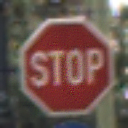
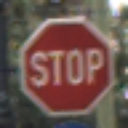
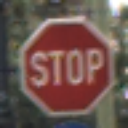
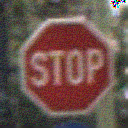
Would you bet your life on a deep learning model trying to recognize a stop sign? In this post, I show why you shouldn’t (at least in theory) by exploring adversarial attacks hands on. Using subtle pixel changes, we’ll trick CNNs into misintepreting a stop sign - the one you’re seeing as a thumbnail is actually not recognized by the model!
Author

Simon Morin

Published

January 15, 2025

Take a look at these two pictures:

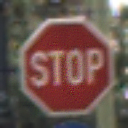
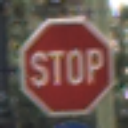
Adversarial stop sign Regular stop sign

They look almost identical! As a human, you could clearly recognize them as both being stop signs. However one of them really confuses a CNN - despite clearly being a stop sign, the first image (on the left) is being recognized as a “Right of way” sign (meaning “You have the right of way that the next intersection”) - so the exact opposite of what you would want a model to do! In this post, we’ll create the exact images you see right now and show you how to fool a model.

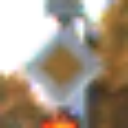
We’ll be using the German Traffic Sign Recognition Benchmark (GTSRB) for this task. The dataset just contains labeled images of german traffic signs, what I want to do is to fool the model to predict a “STOP” sign as a “Right of way” (“Go”) sign.

1. Getting the training data and preprocessing

Before we can start the attack, we need a model of course - in this case, we’re gonna train the model ourselves. It’s going to be a simple, AlexNet inspired model that should be very easy and quick to train (especially since I’m running this notebook locally).

If you don’t really care about this part, feel free to skip to part 4) which contains the actual adversarial attack :)

import torch
from pathlib import Path
from PIL import Image
from urllib.request import urlretrieve
from accelerate import Accelerator
from torch.utils.data import Dataset, DataLoader
from torchvision.transforms import v2
import pandas as pd
import zipfile
import os

dataset_path = Path.cwd() / "dataset"
download_path = Path.cwd() / "dataset.zip"
dataset_url = "https://www.kaggle.com/api/v1/datasets/download/meowmeowmeowmeowmeow/gtsrb-german-traffic-sign"

accelerator = Accelerator()

if not dataset_path.exists():
    urlretrieve(dataset_url, download_path)
    with zipfile.ZipFile(download_path, "r") as zipped_ds:
        zipped_ds.extractall(dataset_path)


df = pd.read_csv(dataset_path / "Train.csv")
df.head()
Width Height Roi.X1 Roi.Y1 Roi.X2 Roi.Y2 ClassId Path
0 27 26 5 5 22 20 20 Train/20/00020_00000_00000.png
1 28 27 5 6 23 22 20 Train/20/00020_00000_00001.png
2 29 26 6 5 24 21 20 Train/20/00020_00000_00002.png
3 28 27 5 6 23 22 20 Train/20/00020_00000_00003.png
4 28 26 5 5 23 21 20 Train/20/00020_00000_00004.png

So far, so good. We now have the dataset on our machine. The next step is to create a pytorch Dataset that manages the image transforms and labels for us.

class TrafficSigns(Dataset):
    def __init__(self, dataframe, base_path, transforms=v2.Compose([v2.Resize((128, 128)), v2.ToImage(), v2.ToDtype(torch.float32, scale=True)])):
        data = [
            (base_path / x["Path"], x["ClassId"]) for _, x in dataframe.iterrows()
        ]
        self.paths, self.labels = list(zip(*data))
        self.transforms = transforms


    def __len__(self):
        return len(self.paths)


    def __getitem__(self, i):
        image_path = self.paths[i]
        label = self.labels[i]
        image = Image.open(image_path)
        image = self.transforms(image)
        return image, torch.tensor(label)

train_ds = TrafficSigns(dataframe=pd.read_csv(dataset_path/"Train.csv"), base_path=dataset_path)

image, label = train_ds[42]
pil_image = v2.ToPILImage()(image)
pil_image

valid_ds = TrafficSigns(dataframe=pd.read_csv(dataset_path/"Test.csv"), base_path=dataset_path)

image, label = valid_ds[42]
pil_image = v2.ToPILImage()(image)
pil_image

Great! We now have a training and validation set which both contain the images! Note the images are loaded “on-demand” (when directly using the dataset). We’re effectively only storing the paths, only if you access an image, the image is opened and loaded.

2) Building the model & training

pickle_path = Path.cwd() / "model.pkl"

# Check how many classes there are (assuming all classes are present in the training data)
len(set(train_ds.labels))
43
# model = resnet18()
from torch import nn
model = nn.Sequential(
    nn.Conv2d(3, 6, 3),
    nn.MaxPool2d(2),
    nn.BatchNorm2d(6),

    nn.Conv2d(6, 12, 3),
    nn.MaxPool2d(2),
    nn.BatchNorm2d(12),

    nn.Conv2d(12, 24, 3),
    nn.MaxPool2d(2),
    nn.BatchNorm2d(24),

    nn.Conv2d(24, 48, 3),
    nn.MaxPool2d(2),
    nn.BatchNorm2d(48),

    nn.Conv2d(48, 48, 3),
    nn.BatchNorm2d(48),

    nn.Flatten(),
    nn.Linear(48 * 4 * 4, 256, bias=True),
    nn.LeakyReLU(),
    nn.Linear(256, 43),
)

This will be the architecture we’ll be using. It’s a simple, AlexNet inspired model architecture since it’s easy & efficient to train (I’m actually going to do this on my local machine) and has a relatively high accuracy (although there are of course far better models out there).

from sklearn.metrics import accuracy_score # using accuracy as a metric
learning_rate = 1e-4
max_lr = 2e-3
batch_size = 64
epochs = 10
loss_fn = torch.nn.CrossEntropyLoss()
opt = torch.optim.Adam(model.parameters(), lr=learning_rate)
scheduler = torch.optim.lr_scheduler.OneCycleLR(opt, max_lr=max_lr, epochs=epochs, steps_per_epoch=batch_size)

train_dl = DataLoader(train_ds, batch_size=batch_size, shuffle=True)
valid_dl = DataLoader(valid_ds, batch_size=batch_size)

I’ve adapted some “slight” optimizations such as one-cycle fitting (a LR scheduler) to improve the training speed.

from tqdm import tqdm
import pickle

def print_accuracy(epoch, model):
    model.eval()
    # Disable gradient calculation for validation accuracy
    with torch.no_grad():
        correct_count = 0
        for x, y in valid_dl:
            y_pred = model(x).argmax(dim=1)
            correct_count += (y_pred == y).long().sum().item()
    print(f"Epoch {epoch} | Accuracy: {correct_count / (batch_size * len(valid_dl))}")

if pickle_path.exists():
    print("Trained model found, skipping training...")
    with open(pickle_path, "rb") as pickle_file:
        model = pickle.load(pickle_file)
        model, train_dl, valid_dl = accelerator.prepare(
            model, train_dl, valid_dl
        )
else:
    print("No trained model found, training instead...")
    opt = torch.optim.Adam(model.parameters(), lr=learning_rate)
    model, opt, train_dl, valid_dl, scheduler = accelerator.prepare(
        model, opt, train_dl, valid_dl, scheduler
    )
    for epoch in range(epochs):
        model.train()
        for x, y in tqdm(train_dl):
            opt.zero_grad()
            y_pred = model(x)
            loss = loss_fn(y_pred, y)
            accelerator.backward(loss)
            opt.step()
            scheduler.step()
        print_accuracy(epoch + 1, model)
    with open(pickle_path, "wb+") as pickle_file:
        pickle.dump(model, pickle_file)
Trained model found, skipping training...

3) Quick evaluation

Code
category_labels = [
    "20km/h",
    "30km/h",
    "50km/h",
    "60km/h",
    "70km/h",
    "80km/h",
    "80km/h aufgehoben",
    "100km/h",
    "120km/h",
    "Überholverbot",
    "Überholverbot (nur LKW)",
    "Vorfahrt an der nächsten Kreuzung",
    "Vorfahrtsstraße",
    "Vorfahrt gewähren",
    "Stop",
    "Einfahrt verboten",
    "Einfahrt verboten (LKW)",
    "Durchfahrt verboten",
    "Gefahr",
    "scharfe Kurve (links)",
    "scharfe Kurve (rechts)",
    "kurvige Strecke",
    "Bodenwellen",
    "Schleudergefahr",
    "verengte Fahrbahn (rechts)",
    "Bauarbeiten",
    "Ampel",
    "Zebrastreifen (Achtung)",
    "spielende Kinder",
    "Fahrradfahrer",
    "Glätte",
    "Wildwechsel",
    "Aufhebung aller Beschränkungen",
    "Nur rechts abbiegen",
    "Nur links abbiegen",
    "Nur geradeaus",
    "Nur geradeaus / rechts",
    "Nur geradeaus / links",
    "Rechts vorbeifahren",
    "Links vorbeifahren",
    "Kreisverkehr",
    "Ende Überholverbot",
    "Ende Überholverbot (LKW)",
]
# Put the model in evaluation mode
model.eval();

Now that we have all of the labels, we can quickly check our performace.

from sklearn.metrics import classification_report, ConfusionMatrixDisplay
import matplotlib.pyplot as plt
# Get predictions for the whole valid dataset
y_pred = torch.tensor([])
y_true = torch.tensor([])
for x, y in tqdm(valid_dl):
    preds = model(x).argmax(dim=1).cpu()
    y_pred = torch.cat((y_pred, preds))
    y_true = torch.cat((y_true, y.cpu()))
100%|█████████████████████████████████████████| 198/198 [00:08<00:00, 22.22it/s]

I know this is not the most efficient way to do this, but it get’s the job done :)

print(
    classification_report(
        y_true, y_pred,
        target_names=category_labels
    )
)
                                   precision    recall  f1-score   support

                           20km/h       1.00      0.80      0.89        60
                           30km/h       0.97      0.97      0.97       720
                           50km/h       0.99      1.00      0.99       750
                           60km/h       0.97      0.93      0.95       450
                           70km/h       0.97      0.97      0.97       660
                           80km/h       0.82      0.98      0.89       630
                80km/h aufgehoben       0.95      0.82      0.88       150
                          100km/h       0.97      0.91      0.94       450
                          120km/h       0.94      0.93      0.94       450
                    Überholverbot       0.95      0.98      0.97       480
          Überholverbot (nur LKW)       0.97      0.99      0.98       660
Vorfahrt an der nächsten Kreuzung       0.95      0.95      0.95       420
                  Vorfahrtsstraße       1.00      0.96      0.98       690
                Vorfahrt gewähren       0.98      1.00      0.99       720
                             Stop       0.99      1.00      1.00       270
                Einfahrt verboten       0.89      1.00      0.94       210
          Einfahrt verboten (LKW)       0.96      0.98      0.97       150
              Durchfahrt verboten       1.00      0.98      0.99       360
                           Gefahr       0.98      0.86      0.92       390
            scharfe Kurve (links)       0.98      1.00      0.99        60
           scharfe Kurve (rechts)       0.86      0.99      0.92        90
                  kurvige Strecke       0.94      0.83      0.88        90
                      Bodenwellen       0.93      0.95      0.94       120
                  Schleudergefahr       0.90      0.87      0.88       150
       verengte Fahrbahn (rechts)       0.86      0.84      0.85        90
                      Bauarbeiten       0.99      0.96      0.98       480
                            Ampel       0.94      0.86      0.90       180
          Zebrastreifen (Achtung)       0.79      0.50      0.61        60
                 spielende Kinder       0.94      0.97      0.95       150
                    Fahrradfahrer       0.89      0.99      0.94        90
                           Glätte       0.83      0.86      0.85       150
                      Wildwechsel       0.96      0.99      0.97       270
   Aufhebung aller Beschränkungen       0.85      1.00      0.92        60
              Nur rechts abbiegen       0.98      0.99      0.99       210
               Nur links abbiegen       0.98      0.99      0.99       120
                    Nur geradeaus       0.99      0.96      0.97       390
           Nur geradeaus / rechts       0.98      0.95      0.97       120
            Nur geradeaus / links       0.97      0.98      0.98        60
              Rechts vorbeifahren       0.94      0.98      0.96       690
               Links vorbeifahren       1.00      0.70      0.82        90
                     Kreisverkehr       0.91      0.92      0.92        90
               Ende Überholverbot       0.94      0.77      0.84        60
         Ende Überholverbot (LKW)       1.00      0.99      0.99        90

                         accuracy                           0.96     12630
                        macro avg       0.94      0.93      0.93     12630
                     weighted avg       0.96      0.96      0.95     12630
fig, ax = plt.subplots(figsize=(15, 15))
ConfusionMatrixDisplay.from_predictions(
    y_pred, y_true, display_labels=category_labels, xticks_rotation="vertical", ax=ax
)
plt.show()

from sklearn.metrics import accuracy_score
print(f"Classification accuracy: {100 * accuracy_score(y_true, y_pred):.2f}%")
Classification accuracy: 95.51%

Not a perfect result, but good enough for our case. We could have of couse optimized further (more epochs, data augmentations, learning rate scheduling, different architecture, …).

4) Creating the adversarial attack

Once we have trained the model, we are finally able to alter an image in such a way that it “tricks” our model. Our model we trained is for sure not the best available one, but it’s a great pick for this notebook since it can be trained very quickly and cheaply.

The goal is to trick the model into recognizing a “STOP” sign as a “right of way sign” by using subtle manipulations that cannot be detected by the human eye.

Firstly, let’s load the images.

valid_df = pd.read_csv(dataset_path / "Test.csv")
stop_signs = valid_df.loc[valid_df["ClassId"] == 14]
row_signs = valid_df.loc[valid_df["ClassId"] == 12]

stop_sign_image = dataset_path / stop_signs.iloc[10]["Path"]
row_sign_image = dataset_path / row_signs.iloc[10]["Path"]

stop_sign_image = Image.open(stop_sign_image)
row_sign_image = Image.open(row_sign_image)

resize = v2.Resize((128, 128))

resize(stop_sign_image)

resize(row_sign_image)

Now we know how these images look like. Imagine building a self-driving car that uses our approach to recognize these traffic signs. Falsly recognizing a STOP sign as a right-of-way sign could have catastrophic effects and lead to dangerous accidents.

How do we now modify the stop sign in such a way that the model thinks its a ROW (right of way) sign?

Well, the key lies in gradients - we can use them kind of like we use them for training. Remember what a gradient is and how it’s used: Gradients tell us how we have to adapt a set of variables to minimize (or maximize) a function. During training, we use gradients to minimize the loss by adapting the model parameters. Now we want to maximize the loss by changing the image.

Let’s first use the normal loss to try and trick the model into thinking the image is another type of sign, but not necessarily a right of way sign. After we’ve successfully accomplished that, we can move on with the other attack.

model.eval();

We have to make sure the model is in eval-Mode, otherwise the batch norm and dropout layers would mess up our results.

# Turn the image into a 128x128 tensor
img_transforms = v2.Compose(
    [v2.Resize((128, 128)),
     v2.ToImage(),
     v2.ToDtype(torch.float32, scale=True)]
)
img = img_transforms(stop_sign_image)
img = img.requires_grad_()

We’re actually all set! We can now pass the image through the model and run the gradient calculation.

img = img.to(accelerator.device)
img.retain_grad() # To ensure the gradient is stored
pred = model(img[None, :]) # this adds the batch dimension as the model is expecting the image to have dimension [b x c x w x h]
pred.argmax(dim=1).item()
14
label_index = pred.argmax(dim=1).item()
label = category_labels[label_index]
label_index, label
(14, 'Stop')

Alright, that seems to have worked! Let’s calculate the loss now!

loss_fn = torch.nn.CrossEntropyLoss()
loss = loss_fn(pred, torch.tensor([14]).to(accelerator.device))
loss
tensor(-0., device='mps:0', grad_fn=<NllLossBackward0>)
loss.backward()

That’s it! Let’s have a look at the image gradients.

img.grad[0][0]
tensor([ 7.9515e-12, -4.8681e-14, -5.1051e-11, -3.4999e-11, -1.5462e-11,
         2.8652e-12, -3.3490e-12,  1.8315e-12, -5.3252e-12, -2.6085e-12,
         9.9992e-12,  1.6649e-11, -6.4037e-11, -1.1266e-10,  4.1304e-11,
         6.0503e-11, -1.6770e-10,  6.4394e-11,  3.1666e-10,  2.0871e-10,
         1.3886e-10,  1.4396e-10,  2.8608e-11,  4.9462e-10,  1.0005e-09,
         6.8001e-10,  3.8643e-10, -3.1913e-12,  4.2241e-11, -8.2813e-11,
         1.2312e-10,  4.0078e-10,  1.6970e-11, -5.0389e-10, -3.7885e-10,
        -2.1453e-11, -1.3093e-10,  3.6727e-10,  5.0511e-10,  6.1778e-10,
        -3.5858e-10, -3.9000e-11, -2.6714e-10, -5.4427e-10, -1.4759e-10,
        -6.6502e-10,  1.2302e-10,  6.1655e-10,  1.7434e-10,  5.0003e-10,
        -4.7347e-10,  4.0838e-10,  3.2672e-10,  6.6124e-10,  9.7225e-10,
         1.8263e-10, -1.7866e-10, -8.4257e-10,  2.8796e-10,  4.5176e-10,
         4.4989e-10,  6.5333e-10, -8.8493e-11, -7.4214e-11,  3.6718e-11,
         6.7791e-13, -1.3723e-10, -1.1483e-10,  3.4725e-10,  2.8342e-11,
        -4.0557e-10, -5.1485e-11, -3.4687e-10, -2.2938e-10,  4.5341e-10,
        -8.6721e-10, -5.1750e-10, -2.7343e-10, -2.2354e-11,  0.0000e+00,
         4.9713e-10,  3.1392e-10,  3.9817e-10,  3.0023e-11, -8.1329e-11,
         2.2333e-10,  4.7487e-10,  1.6953e-10, -1.0104e-10,  2.2217e-10,
        -6.2795e-11, -3.6030e-10,  1.0302e-10, -8.4705e-11,  1.9573e-10,
        -3.3150e-10, -2.5148e-10, -3.9117e-10, -2.1955e-11, -8.3709e-11,
         1.0161e-10, -3.4897e-11, -1.8362e-10, -3.5509e-10, -1.2419e-11,
         5.2034e-11,  5.2460e-10,  4.4552e-10,  2.1185e-10, -3.8228e-10,
        -3.4753e-10,  1.7472e-11, -7.3386e-11, -1.6114e-11,  6.2925e-11,
         2.2203e-11,  4.2586e-11, -3.0947e-12, -3.5923e-11, -6.1580e-11,
        -6.7858e-12,  7.3485e-12, -6.3717e-11,  3.4064e-12,  3.9200e-11,
         6.0554e-12,  0.0000e+00,  0.0000e+00], device='mps:0')

Now remember again what the gradient is. The gradient indicates the direction of steepest ascent; if we modify our image in the direction of the gradient, we should maximize the loss and therefore our model should give us another output for the modified image.

Let’s take a look at the gradient now.

gradient = img.grad.clone().detach()
tensor_to_img = v2.ToPILImage()
tensor_to_img(gradient)

We now have acquired the gradient, but the gradient is so small that we can hardly visualize it.

gradient.min(), gradient.max(), gradient.mean(), gradient.std()
(tensor(-7.3446e-08, device='mps:0'),
 tensor(7.7274e-08, device='mps:0'),
 tensor(1.4754e-12, device='mps:0'),
 tensor(5.5846e-09, device='mps:0'))

To counteract this issue, I want to scale the gradient so that it’s between 0 and 1.

positive_gradient = gradient + gradient.min().abs() # minimum is almost always negative
scaled_gradient = positive_gradient / positive_gradient.max()
scaled_gradient.min(), scaled_gradient.max()
(tensor(0., device='mps:0'), tensor(1., device='mps:0'))
tensor_to_img(scaled_gradient)

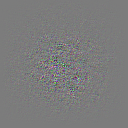
As we can see, a large portion of the gradient seems to be some weird uniform greyish noise - we can’t really see the meaningful parts. Let’s subtract the mean to get a look at the variance of the gradient.

tensor_to_img(scaled_gradient - scaled_gradient.mean())

Finally we got a good look at the gradient! It was kind of expectable that the gradient is very small since the STOP sign is probably a very clear example of what the model has stored in its internal representation.

img = img.detach()

Let’s now manipulate the image by gradually adding the gradient until the model makes a wrong prediction.

epsilon = 0.05
manipulated_image = (img + epsilon * gradient.sign())
tensor_to_img(manipulated_image)

You might have noticed that I didn’t directly use the gradient here. Instead, I used the sign of the gradient instead. This is reffered to as the Fast Gradient Sign Method to generate adversarial examples, first mentioned by Ian Goodfellow in a paper. You can read more about the original approach here.

prediction = model(manipulated_image[None, :])
label_idx = prediction.argmax(dim=1).item()
category_labels[label_idx]
'20km/h'
prediction.softmax(dim=1).max()
tensor(0.8442, device='mps:0', grad_fn=<MaxBackward1>)

After trying around a bit and noising the image; we now got the model to predict something else, in our case the “20km/h” sign with a pretty high confidence (~84.42%)! Now we want to see if we can steer this behavior in some direction.

5) Targetting certain classes

Remember, we take the gradient of the loss function with respect to the weights. That means that we calculate the change of the loss function by adapting the weights. Hence, if we want the model to predict a certain other class, we’d just have to adapt our loss function - or alternatively just use the provided loss with a different label. Let’s try the 2nd option first as it’s easier.

category_labels.index("Vorfahrtsstraße")
12

“Vorfahrtsstraße” is the german word for “Right of way sign” - the one we want the model to detect.

img = img_transforms(stop_sign_image)
img = img.requires_grad_()
img = img.to(accelerator.device)
img.retain_grad() # To ensure the gradient is stored
pred = model(img[None, :]) # this adds the batch dimension as the model is expecting the image to have dimension [b x c x w x h]
loss_fn = torch.nn.CrossEntropyLoss()
loss = loss_fn(pred, torch.tensor([12]).to(accelerator.device))
loss
tensor(23.7557, device='mps:0', grad_fn=<NllLossBackward0>)

Alright, as expected we got a very high loss now! Let’s check the gradient!

loss.backward()
img.grad[0][0]
tensor([ 1.4336e-03,  4.3291e-04, -1.3483e-03,  3.3218e-04,  7.8575e-04,
        -4.9631e-04, -4.6382e-04,  1.6257e-04, -3.9162e-04,  2.0253e-04,
        -3.2710e-04,  1.1134e-03, -3.2547e-03, -5.7371e-03,  6.4268e-03,
         3.3202e-03,  2.2760e-03, -2.6238e-03, -4.3385e-03,  4.7569e-03,
        -4.0132e-03,  4.7953e-03, -1.1668e-02,  5.4551e-03,  3.7624e-03,
         1.3856e-02, -5.5960e-03, -5.9615e-03,  5.7937e-03,  3.0264e-03,
        -6.3789e-03, -6.9701e-05, -8.1466e-03, -1.2265e-03, -3.0630e-04,
         8.7819e-04, -2.5522e-03, -7.9549e-04,  3.2721e-03, -8.6886e-03,
        -5.7587e-03,  1.0422e-03,  3.1253e-02,  3.1745e-02,  6.9614e-03,
         3.6221e-02,  1.3026e-02,  3.3727e-03,  1.0554e-02,  2.7223e-03,
         4.2865e-03, -7.5990e-03, -9.8133e-03, -2.3600e-02,  1.1359e-02,
        -8.7078e-03, -5.3581e-04,  2.9204e-02,  3.9392e-02, -1.2578e-02,
         2.8618e-02,  1.6221e-02,  5.6108e-03, -5.3766e-03, -3.2614e-03,
        -6.0214e-05,  9.3658e-03,  1.0331e-03, -5.8923e-03, -8.6745e-04,
         9.3366e-03, -3.5330e-03, -3.1297e-03,  1.5012e-03,  9.0596e-04,
         7.1583e-03, -1.2356e-02, -1.2624e-02,  1.2991e-03,  0.0000e+00,
         6.2589e-03,  3.9522e-03,  4.9649e-03,  1.2124e-04, -2.3079e-05,
         1.2274e-02, -2.5869e-02,  3.5608e-04, -3.9568e-04,  8.5529e-04,
        -8.6312e-03,  1.2393e-02, -8.0992e-03, -1.5438e-02, -2.8265e-04,
        -1.6949e-02, -7.4760e-03, -1.9997e-02, -5.4895e-03, -5.6314e-03,
         9.1796e-03,  4.5238e-03,  9.4295e-03,  4.5340e-03,  1.4250e-03,
        -1.5997e-02,  1.4680e-03,  6.6741e-03,  8.6918e-04, -6.0357e-03,
        -2.1914e-03,  5.1818e-03, -2.2279e-03, -5.1460e-03, -1.3599e-02,
         5.3595e-03,  5.6933e-03, -2.6369e-03, -2.6378e-03,  5.3089e-03,
         3.7757e-03, -1.3161e-03,  4.1159e-03,  1.1102e-03, -3.4936e-03,
        -3.3932e-03,  0.0000e+00,  0.0000e+00], device='mps:0')
gradient = img.grad.clone().detach()
gradient.min(), gradient.max(), gradient.mean(), gradient.std()
(tensor(-3.4569, device='mps:0'),
 tensor(3.7256, device='mps:0'),
 tensor(-1.0679e-06, device='mps:0'),
 tensor(0.2656, device='mps:0'))
positive_gradient = gradient + gradient.min().abs()
scaled_gradient = positive_gradient / positive_gradient.max()
tensor_to_img(scaled_gradient)

tensor_to_img(scaled_gradient - scaled_gradient.mean())

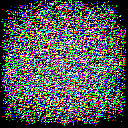
There’s not really much to see here, but we can see that the gradient is a bit larger (and with higher magnitude, take a look at the min / max values and compare them to the previous example in section 4) since we would have to change the pixels quite a bit for our image to resemble a right of way sign.

epsilon = 0.05
def gradient_step(img, gradient, epsilon):
    return img - gradient * epsilon


manipulated_image = gradient_step(img, gradient, epsilon)
tensor_to_img(manipulated_image)

This is our manipulated image now (same as above). As you can see, there’s almost no difference to the original image (see below).

preds = model(manipulated_image[None, :])
preds.argmax(dim=1), preds.softmax(dim=1).max()
(tensor([12], device='mps:0'),
 tensor(0.8975, device='mps:0', grad_fn=<MaxBackward1>))

Wow that worked really well! Contrary to the fast sign gradient method, we just did gradient descent on the image here instead to minimize the loss for the right of way sign. In our case, this took just one single try to make the model think the sign was in fact a right of way sign with 89.75% confidence!

resize(stop_sign_image)

For comparison, here’s the original image.

category_labels[preds.argmax(dim=1).item()]
'Vorfahrtsstraße'

As we can see, we were sucessfull with this very simple approach. There are more sophistiacted approaches out there such as “Projected Gradient Descent” which is very similar to what we did, but ensures that the manipulated image does not exceed a certain perturbation limit (usually also multiple steps are done), see here and here if you want to know more.

With LLMs hitting the mainstream nowadays, studying adversarial attacks on LLMs is also somewhat interesting. If you want to find out more about that, see here.

I hope this post was somewhat interesting, helpful and a somewhat gentle introduction into adversarial attacks, I always appreciate feedback :)